
 CS
CS UK
UK EN
EN
Remote Control, Diagnostics and Service
Web Server OZW672 – Your entire boiler room on your phone. Service without a visit. No monthly fees.
Control your heating from the sofa, from work, or from Croatia. When something goes wrong, a technician connects within minutes – no site visit needed. You pay once, use it forever.
15 years of daily experience – not marketing, but reality
When you buy the OZW672, you are not just buying hardware. You gain access to a team that has been working with this system every day for over 15 years.
We know what works and what does not. Over that time we have seen thousands of installations, hundreds of different network configurations, dozens of router types and connections. When you run into a problem, we have most likely already dealt with it – and we know how to solve it.
Remote diagnostics is our daily bread. We do not sell the web server as a marketing add-on that nobody knows how to use. Our service team actively uses it in day-to-day customer support. We know every parameter, every screen, every function.
We are not just sellers – we are users. Many companies sell remote control as a box feature bonus. We built our entire service model on it. When you call HOTJET technical support, the technician is very likely already looking at your heat pump – seeing current temperatures, states, operating history. You do not have to describe anything, you do not have to measure anything.
We don’t waste time finding the problem. We solve the problem.
15+ years of active remote management use, every day, summer and winter!
We will help you get started. The first connection can be tricky for some – portal registration, pairing with the controller. We will not leave you on your own. In early 2026 we provide basic setup and verification free of charge.
Download the app
Siemens HomeControl IC – the entire boiler room in your pocket. Temperature control, modes, time programmes and fault overview right from your phone.


Compatibility:
- iOS 16.0+ (iPhone, iPad)
- Android 8.0+
- Web Server OZW672 + internet
- Cloud Siemens Synco IC (EU, GDPR, HTTPS)
- Unlimited number of users
Siemens cloud portal – create your account and connect the web server here. You use the same account for the mobile app.
(same as Climatix IC portal)
Documentation for download:
No time to read? Here is everything that matters
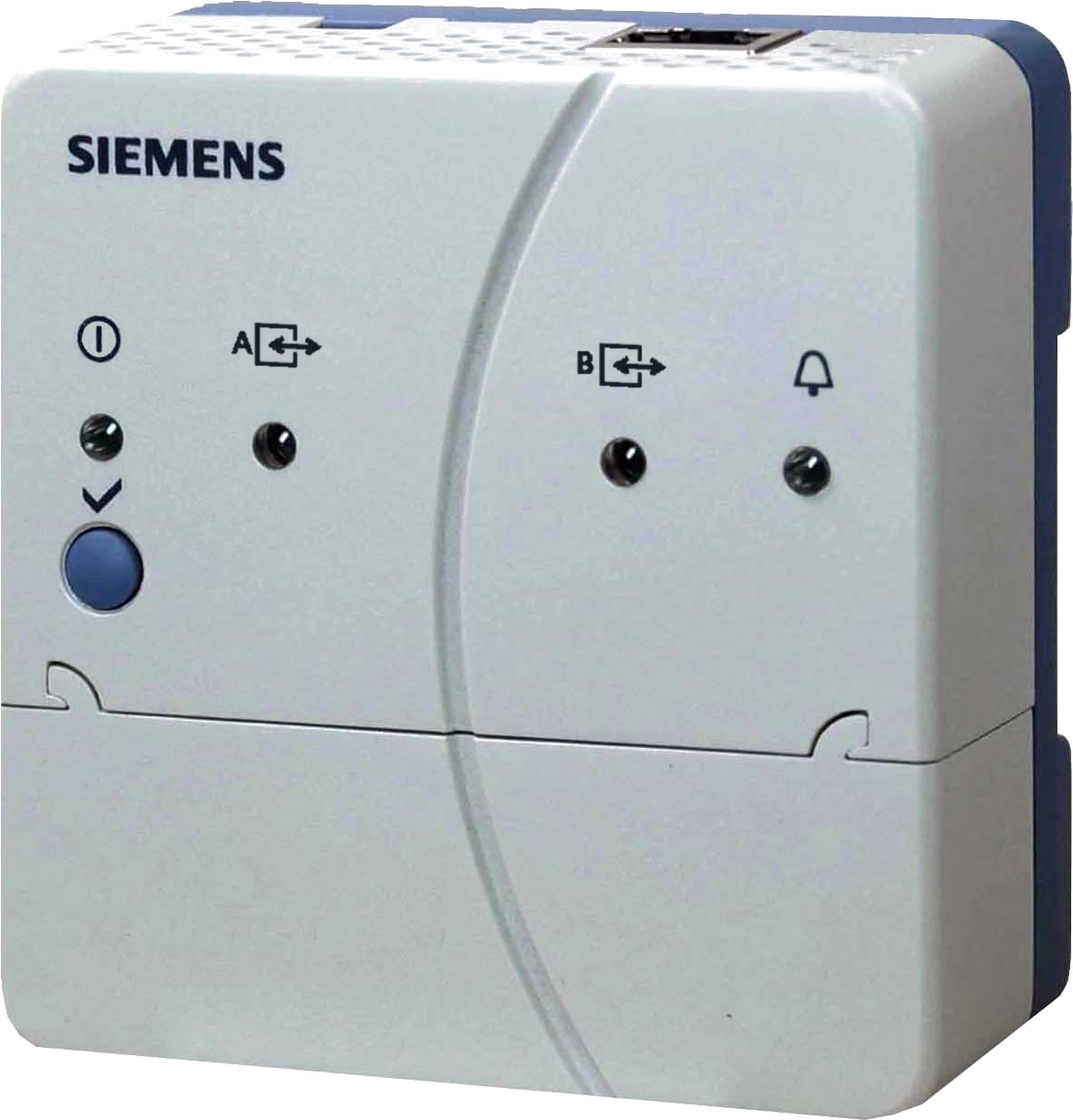
- What it is: A small box (palm-sized) that connects your HOTJET heat pump to the internet
- What it does: You control the entire boiler room from your phone or computer – temperatures, modes, time programmes, overview of all sensors
- Remote service: A technician connects from anywhere, sees the problem, and often resolves it without a visit
- Automatic notifications: E-mail on fault, connection loss, limit exceedance
- No monthly fees: Pay once, use for life – the whole family and service included
- Compatibility: Works even with 25-year-old Siemens controllers – not just new heat pumps
- Portable: Replacing your heat pump? Take the OZW672 with you
- Siemens Cloud: Servers in the EU, GDPR compliant, encrypted connection – no dubious third-party services
- 15+ years of experience: HOTJET does not just sell remote management – we built our entire service model on it
Why get Web Server OZW672?
HOTJET supplies Web Server OZW672 as part of every new heat pump in the Czech Republic and Slovakia. Remote management is not an optional extra for us – it is the foundation our entire service model is built upon.
Do you have a heat pump but need to go down to the boiler room to change the temperature or check that everything is running? Or does your service technician charge for a visit to solve something that could be fixed remotely in five minutes?
Web Server OZW672 changes all of this. It is a small box that connects to your controller and your router – and suddenly you have the entire boiler room on your phone. And that is not all: your service team has access to full remote diagnostics, so they resolve most issues without a visit.
Don’t have a web server? The very first HOTJET heat pumps were not equipped with a web server – it did not exist at the time. In some installations the installer did not include one because it used to be optional. But nothing is lost. The OZW672 can be purchased and retrofitted to any HOTJET heat pump with Siemens controls. And not just heat pumps – the web server also works with gas boilers and other applications with compatible Siemens controls.
What you get
Control from anywhere
Set the temperature from the sofa, from work, or from your holiday. Switch to “holiday” mode when you leave. Turn on party mode when guests arrive. All you need is a phone or computer – it works from any internet-connected device.
Full boiler room overview, not just the heat pump
The OZW672 is not just “smart heat pump control”. You see everything the controller measures and manages: outdoor temperature, heating circuits, hot water, buffer tank, pool, solar, mixing valves, circulation pumps. Simple WiFi modules from competitors show you a few basic numbers. The OZW672 shows you the complete picture of what is happening in the boiler room.
Service without a visit
Saturday evening, minus fifteen, the heat pump reports an error. You call service, the technician connects within minutes, sees the problem, and often resolves it remotely. No waiting until Monday, no site visit. A few saved visits per year and the web server has paid for itself.
Automatic notifications
When something goes wrong, you receive an e-mail. No need to check the boiler room. No need to watch whether the heating is running. The cloud also checks the connection status every 5 minutes – if the internet or power goes down, it alerts you to that as well.
No monthly fees
Pay once, use for life. No subscription, no annual fees. Access for the whole family, the installer, service – everyone with their own permissions, all at the same time. After five years? Still free. After ten years? Still free.
Your data is safe
The cloud is operated by Siemens, servers are in Europe (primary in Northern Europe, backup in Western Europe). Encrypted HTTPS connection, full GDPR compliance. No dubious third-party services.
How it works – 4 simple steps
1. Plug in the cable
The OZW672 connects to your router with an Ethernet cable. Why Ethernet and not WiFi? Because boiler rooms, basements and garages are typical places where WiFi does not reach. A cable always works. If the router is not nearby, you can use a powerline adapter (Ethernet over the mains), an extender, or run the cable alongside PV cabling. Alternatively, install the OZW672 right next to the router and connect it to the controller in the boiler room via the two-wire bus.
2. The LED lights up
On typical home networks you do not need to configure anything – neither on the router nor on the web server. No IP address, no ports, no settings. Plug in the cable, the web server obtains an address from the router via DHCP and registers with the cloud.
3. Register on the portal
Create an account on the Siemens Synco IC cloud portal (free) and add your web server using the activation code. Registration takes a few minutes.
4. Download the app
The Siemens HomeControl IC app for iOS or Android. Log in with the same credentials as for the cloud – and you have the entire boiler room in your pocket.
What you see and control in the app
The HomeControl IC app is your daily window into the boiler room. A simple, clear interface:
- Current temperatures – outdoor, heating circuits, hot water, buffer tank, pool
- Temperature settings – for heating and hot water
- Operating modes – comfort, setback, holiday, party – with a single tap
- Time programmes – for each day of the week, for each circuit separately
- Fault alerts – via e-mail
And when you need more? From the app you can jump into the web interface with a single tap, where you can configure absolutely everything – hundreds of parameters, heating curves, diagnostics. It is more comfortable on a computer, but it works on a phone too.
Access for the whole family: Every family member, the installer, service – everyone can have their own account with their own permission level. The number of users is unlimited.
Remote service – real savings
Imagine this: it is Saturday evening, minus fifteen outside, and the heat pump reports an error.
Without a web server: You call service, describe what you see on the display. The technician guesses remotely. The earliest visit is Monday. They arrive, diagnose, perhaps need a part – another visit. Two visits, a few days in the cold, unnecessary costs.
With a web server: You call service. The technician connects within minutes, sees current temperatures, states, operating history. The problem is often resolved immediately – reset the fault, adjust a parameter, identify the cause. If a visit is still needed, they arrive with exactly what is required. One visit instead of two, hours instead of days.
Comparison: what you save
| Situation | Without remote access | With OZW672 and HOTJET support |
|---|---|---|
| HP reports fault | You call, describe, wait for a visit | Technician looks, often resolves immediately |
| Unhappy with temperatures | You experiment with settings | Technician checks parameters and suggests adjustments |
| Want to optimise consumption | You don’t know where to start | We analyse trends and recommend changes |
| Warranty claim or dispute | Your word against theirs | We have data – operating history is available |
It is not just about money. You do not have to take time off work to be home when the technician arrives. You do not have to wait through the weekend for Monday’s service. You do not have to describe over the phone what is flashing on the display. You do not have to study manuals – we have done that for you.
No monthly fees – ever
This is a fundamental difference compared to many competing solutions. You pay for the OZW672 once and use it for life.
- No subscription
- No annual fees
- Unlimited number of users
- Cloud operated by Siemens, servers in the EU
- GDPR compliant, encrypted HTTPS connection
And when you replace your heat pump with a newer model? You take the OZW672 with you. Simply reconnect it to the new controller. It is not tied to a specific unit – it is tied to the bus used by all Siemens Albatros controllers.
Compatibility – even 25-year-old systems
The OZW672 communicates with Siemens controllers via the LPB/BSB bus. This means support not only for current ranges, but also for controllers that have been on the market for over two decades and are still running.
Supported controllers:
- Current HOTJET ranges: RVS21, RVS61, RVS46
- Older HOTJET controllers: RVS41, RVS63
- Historic Siemens controllers (1990s onwards): RVA43, RVA46, RVA53, RVA63 and more
- Boiler controllers: RVL, RVD, RVP series
- Burner controllers: LMU, LMS series
Do you have an older but working heat pump or boiler with Siemens controls? You can get it online and into the cloud. No controller replacement, no system modifications – simply connect the OZW672 to the bus and you are done.
For installers and service technicians
From here on it gets more technical. If you are an end user, everything you need is above. If you are an installer or service technician – this is where the interesting stuff starts.
Why recommend OZW672 to customers
- Fewer warranty visits – remote diagnostics resolves around 90% of requests without a visit
- Happier customers – they have an overview, feel in control, call less with questions like “is this normal?”
- Professional image – you offer a service most competitors do not have, or do not know how to use
- Data in disputes – operating history, temperature records, operating states – everything is available
What the service technician sees – a completely different level
While the customer sees simple temperature and mode controls, the service technician has access to:
- Complete controller configuration – hundreds of parameters
- All sensors in real time
- Heating curves and their settings
- Diagnostics and operating history (last 500 events)
- Ability to change parameters remotely
Remote Tool Access via Siemens Synco IC
The Remote Tool Access function creates a secure tunnel to the web server through the cloud. You see and control everything just as if you were sitting right next to the unit. Compatible with the professional service software ACS790.
Typical use cases:
- Support during commissioning without being on site
- Remote comparison of parameter sets when troubleshooting
- Configuration adjustments after a phone consultation with the customer
- Creating a commissioning report from the office
Requirements: Web server firmware version 7.0+, access level “Service Level” or higher.
Limitations: Actions requiring physical button presses on the device cannot be performed. Continuous connection is limited to 24 hours (reconnection needed afterwards).
Trending and data logging
The OZW672 is a fully-fledged datalogger. 5 trending channels, each holding up to 100 data points. Sampling frequency is configurable from 1 second to 24 hours.
Recording capacity
| Recording interval | Number of points | Recording duration (channel 1) | Recording duration (channels 2–5) |
|---|---|---|---|
| 1 second | 1 | 14 days | 1.8 days |
| 5 seconds | 5 | 30 days | 4.3 days |
| 1 minute | 10 | 210 days | 30 days |
| 15 minutes | 100 | 371 days | 53 days |
Channel 1 has 7x larger memory for long-term trends – at 15-minute intervals with 100 data points, you store over a year of data.
Export: Web browser, e-mail, FTP/FTPS/SFTP. Local recording works independently of the cloud – the history is stored directly on the device.
Plant Web Pages – custom visualisation
Custom visualisation pages with a house floor plan or heating system schematic. You can place up to 100 data points on each page – temperatures, states, controls. When a fault occurs you immediately see where the problem is.
For standard HOTJET controller applications, schematics can be exported directly from the professional software ACS790 and uploaded to the web server.
Energy Indicator – monitoring energy efficiency
A function based on the EN 15232 standard. The web server monitors selected data points and compares them against set limits:
- Green leaf – value is within the energy-efficient range
- Orange leaf – value has exceeded the limit, the system is running inefficiently
Regular reports are sent by e-mail – an overview of whether the heating is working optimally or energy is being wasted somewhere.
Notifications and alarms – details
- E-mail notifications to up to 4 recipients with configurable priority (urgent / all)
- Sending schedule – 3 times per day + holidays / special days
- System reports at regular intervals (1–255 days)
- Physical button on the OZW672 for immediate report to all recipients
- History of the last 500 events – faults, messages, parameter changes
- Automatic connection monitoring – the cloud checks online status (every 5 minutes by default). An alert is sent when the connection is lost.
Three access levels
| Level | What they can do |
|---|---|
| End user | Temperature and mode control, fault display, own account management |
| Service | All of the above + access to service data, trending, history download, web server firmware update |
| Administrator | All of the above + device list editing, visualisation creation, Energy Indicator configuration, all account management |
The number of simultaneously logged-in users is not limited – data throughput is shared between them.
Important: The web server is fully managed by the customer or installer. HOTJET only has access when the customer or installer grants it. That is the foundation of security and trust.
Why Ethernet and not WiFi – technical reasons
The OZW672 uses Ethernet exclusively. Boiler rooms, basements, garages – typical places where WiFi signal is unreliable. Ethernet always works.
Alternatives when the router is not nearby:
- Powerline adapter (Ethernet over the mains)
- WiFi extender with an Ethernet port on the other end
- Cable run alongside PV cabling
- OZW672 installed next to the router, connected to the controller via the two-wire LPB/BSB bus
On home networks: DHCP, no router configuration. Plug in the cable, the right LEDs light up, the web server registers with the cloud.
In commercial environments: Consult with the IT department – outgoing connections on port 443 (HTTPS) may need to be allowed.
Connection interfaces
| Interface | Specification |
|---|---|
| Ethernet | 100BASE-TX, RJ45, Auto-MDI(X), max. 100 m Cat-5 cable |
| USB | USB 2.0 (Mini-B), max. 12 Mbps – for local service |
| LPB/BSB | 2-wire bus, terminals DB/CL+ and MB/CL−, load E5 |
Product variants
| Model | Description | Typical use |
|---|---|---|
| OZW672.01 | For 1 device on LPB/BSB | Typical home installation |
| OZW672.04 | For up to 4 LPB devices | Larger buildings, cascades |
| OZW672.16 | For up to 16 LPB devices | Commercial buildings, apartment blocks |
Digital inputs for external signals
The OZW672 has 2 digital inputs (D1, D2) for potential-free contacts:
- Safety thermostats
- Signalling from other systems
- Operation monitoring contacts
When a contact is triggered, a fault state is activated and a notification is sent.
Supported protocols
Web communication
| Protocol | Port | Security |
|---|---|---|
| HTTP | 80 | Unencrypted (disabled by default) |
| HTTPS | 443 | TLS encryption (recommended) |
Data export
| Protocol | Security |
|---|---|
| FTP | Unencrypted – not recommended |
| FTPS | TLS encryption – recommended |
| SFTP | SSH tunnel – recommended |
SMTP with TLS 1.3 (if the mail server supports it).
Software and applications – overview
| Application | Platform | Purpose |
|---|---|---|
| Web interface | Any browser | Complete control and configuration |
| HomeControl IC | iOS, Android | Mobile control via cloud |
| ACS790 | Windows | Professional service software |
Firmware updates
Web server OZW672 firmware can be updated via a web browser. Updates preserve all settings.
Important: Heat pump controller firmware (RVS21 etc.) cannot be updated remotely. Siemens controls are mature, stable and proven – no bugs have appeared in years and no new features need to be added.
| Update type | Description | Preserves settings |
|---|---|---|
| Firmware update | OZW672 software update | Yes |
| System definition update | Support for new controllers | Yes |
| Factory update | Complete reinstallation | No |
Technical specifications
Physical parameters and operating conditions
| Parameter | Value |
|---|---|
| Dimensions | 87.5 x 90 x 39.2 mm |
| Weight | 136 g |
| Protection | IP30 per EN 60529 |
| Operating temperature | 0 to +50 °C |
| Storage temperature | -40 to +70 °C |
| Humidity (operating) | 5–95% RH (non-condensing) |
Power supply
| Parameter | Value |
|---|---|
| Input voltage | AC 230 V ±15%, 50/60 Hz |
| Output voltage | DC 24 V SELV |
| Power consumption | 2 W typical, max. 3 VA |
| Plug | Euro plug per EN 50075 |
Mounting
| Method | Description |
|---|---|
| DIN rail | Standard rail TH 35-7.5 |
| Wall mount | 2 screws (73 mm spacing) |
| Orientation | Horizontal or vertical |
LED indicators
| LED | State | Meaning |
|---|---|---|
| Operation | Red on | Operating system starting |
| Red blinking | Application starting | |
| Green on | Running, Energy Indicator OK | |
| Orange on | Running, Energy Indicator exceeded | |
| Green/orange blinking | Connected to Synco IC portal | |
| LPB/BSB | Green on | Bus operational |
| Green blinking | Bus communication | |
| Fault | Red on | Active fault |
Connection terminals
LPB/BSB bus:
| Terminal | Label | Function |
|---|---|---|
| 1 | DB/CL+ | Data/Clock + |
| 2 | DB/CL+ | Data/Clock + (parallel) |
| 3 | MB/CL− | Data/Clock − |
| 4 | MB/CL− | Data/Clock − (parallel) |
Digital inputs:
| Terminal | Label | Function |
|---|---|---|
| 1 | D1 | Digital input 1 |
| 2 | M | Common terminal |
| 3 | D2 | Digital input 2 |
| 4 | M | Common terminal |
Certifications
| Certification | Label |
|---|---|
| EU | CE |
| Australia/New Zealand | RCM |
| Eurasia | EAC |
| Environmental | RoHS |
| Product standard | EN 60950-1 |
Package contents
- Web server OZW672
- Power supply AC 230 V → DC 24 V with Euro plug
- Ethernet cable Cat-5
- USB cable (type A – type Mini-B)
- 2x cable tie
- Installation manual M5712
Summary
| What you get | Why it matters |
|---|---|
| Mobile control from anywhere | No trips to the boiler room |
| Remote service | Saved visits, faster resolution |
| Cloud Siemens Synco IC | Secure access without complex configuration |
| Ethernet instead of WiFi | Reliable connection even in the basement |
| Local data recording | Independence from the cloud |
| No fees | Pay once, use forever |
| Portability | Take it with you to a new heat pump |
| 25+ year compatibility | Works even with old Siemens controllers |
| GDPR, servers in the EU | Your data is safe |